
2026
Creating a Question on RightOn
Redesigning how teachers create questions for games on RightOn’s platform, focusing on improving speed to question completion by introducing a more controlled and transparent AI-assisted workflow.
Project Focus
MVP Redesign
My Role
UX/UI Intern
Timeframe
70 hrs
Tools
Figma

Situation
My Focus
Impact
RightOn is a platform where teachers can create questions for games to help students learn from mistakes and misconceptions.
The question creation experience had recently been redesigned to improve the manual workflow, but creating high-quality questions was still time-consuming and effort-heavy.
Design the AI-assisted question creation flow to reduce effort and improve clarity, while fitting into the redesigned manual workflow.
Product
Improved control, transparency, and usability of AI-assisted content creation.

The Problem
Teachers needed a fast way to create questions that fit the context of their classroom, but the existing workflow was confusing, time-consuming, and inefficient. AI was introduced to help, but lacked clarity and control, reducing trust and usefulness. As a result, teachers often defaulted to manual workflows or dropped off the platform altogether.
Creating questions wasn’t just tedious, it was frustrating and unpredictable.
Key Insight
After the initial redesign without AI, teachers no longer had trouble creating questions, but they needed a faster way to complete them, especially generating answer options and explanations.
-
AI had the potential to help, but only if it fit into their existing workflow
-
The existing AI tool felt unclear or unpredictable, adding friction instead of reducing it
How might we help teachers save time creating questions that fit the needs of their classrooms?

What if we improved the existing AI generation tool that was meant to improve speed to question completion.
KEY DECISIONS
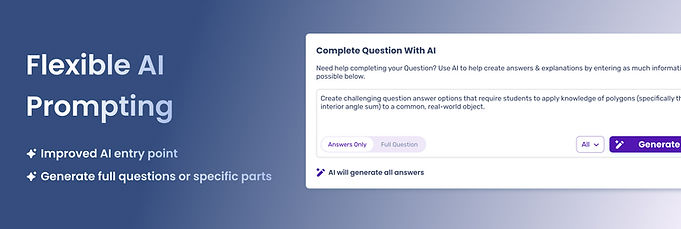
Flexible & guided AI entry point
A prompt-based entry point was created that allows different levels of generation depending on user intent when creating a question.
Instead of forcing a single workflow, the system adapts to different needs.
Before
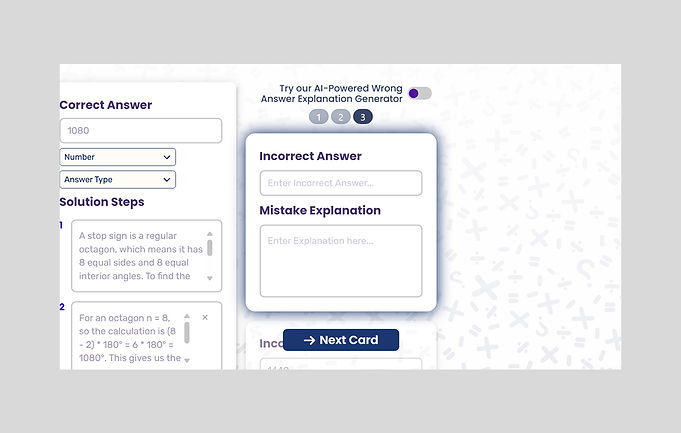
After

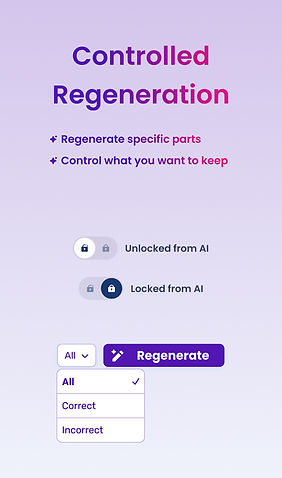
Controlled regeneration
I designed a system that allows users to regenerate individual answer options, regenerate selected groups, or regenerate everything.
This shifts AI usage from all or nothing to iterative and controllable.
Before

After

Make AI behavior more transparent
Users had difficulty understanding what would happen and when it would happen when using the old AI tool, so I refined the interaction patterns and language with more intentional placement of AI controls.
This made the system predictable and not feel like rolling a dice.
Before
After

TESTING & ITERATION
Early versions of the AI flow were tested with 9th grade teachers.
What did I learn?
While the initial workflow was directionally strong, usability testing revealed gaps in clarity that required refinement rather than a full redesign.
Key insight 1
Validated direction
-
Users were able to complete key tasks
-
The structure of the flow made sense.
-
AI-assisted creation showed promise for teacher needs.
Key insight 2
Lack of clarity
-
The scope of AI generation was still not fully clear.
-
There was confusion around what certain signifiers trigger, such as “Regenerate”.
What changed after testing?
Clarifying the scope of AI
Two unique AI prompt entry points were created for two separate actions: completing a question or creating a full question from scratch.
This removes ambiguity on what an entered prompt is for and what information is needed from users before AI performs a task.
Before

After

Improved signifiers
UI iterations were made to improve clarity on critical action triggers for question answer option iteration.
Before

After

Before

After


REFLECTION
Postponing possible solutions
Features like short-phrase “filters” for prompting were explored but ultimately deprioritized due to:
-
Cognitive load concerns
-
Implementation complexity
-
Time constraints

Impact
Early feedback indicated that the experience felt more intuitive and aligned with how teachers actually work.
-
Made AI-assisted creation more structured and predictable
-
Gave teachers clearer control over what gets generated and updated
-
Reduced confusion around how AI behaves within the system
What's Next?
There are still plenty of opportunities to improve the experience. One area explored but not included in the MVP was short-phrase filters for AI prompting.
These could:
-
Speed up repetitive prompt parameters
-
Improve onboarding for AI interactions
-
Further refine generation transparency

